Free Online Meme Editor — Make Custom Memes
Free online meme editor: caption 400+ templates, your own image or a GIF. Type on the meme, style the text, add emoji and images. No sign-up needed.
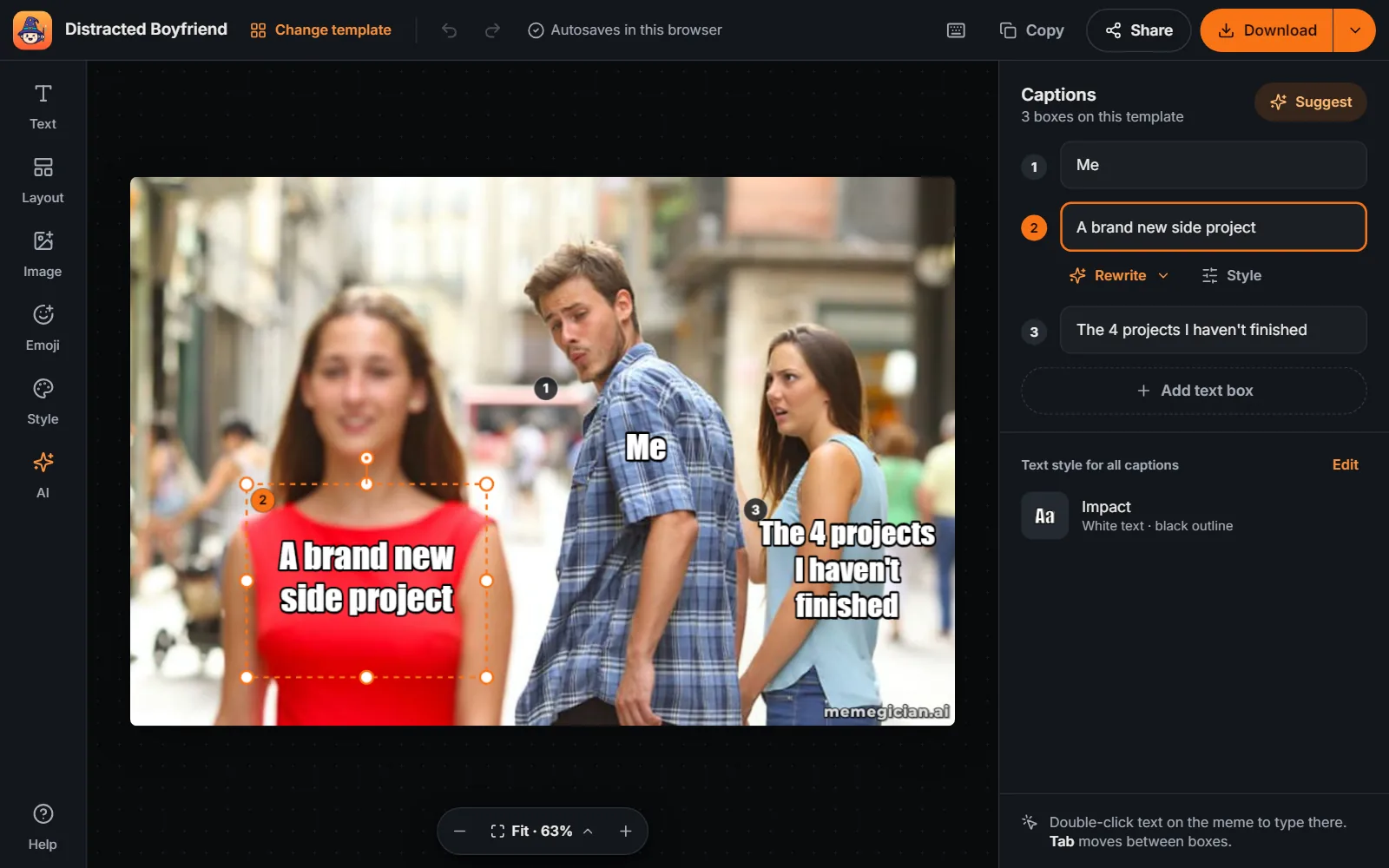
Memegician's free online meme editor captions any of 400+ meme templates, your own image or an animated GIF. Every text box has a number on the meme that matches its caption field, and you can type in the list or directly on the meme. Boxes snap into line as you drag, you can zoom in for detail, and a hint tells you when a caption is too long for its box.
It's the same editor on phones, tablets and desktops, with Download always in view. Style captions with 10 fonts, colours, outline, alignment and rotation, add header and footer bars, emoji and image layers, or restyle a template with free AI Styles. Editing and downloading need no sign-up. AI caption ideas are built in (3 a day for guests), and a free account adds AI rewrites (5 a day) and background removal.
What's in the meme editor
- One editor on every screen: The same editor on phones, tablets and desktops. Download is always in view, next to Copy and Share.
- Numbered captions: Each text box has a number on the meme that matches its caption field. Type in the list, or double-click the text on the meme and type there.
- Snapping, zoom and fit hints: Boxes snap to the centre, the margins and each other as you drag. Zoom in for detail, and a hint warns you when a caption is too long for its box.
- Text style: 10 fonts, text and outline colours, outline thickness, outline, shadow, bar or plain looks, ALL CAPS, alignment, rotation and layer order. Add header and footer bars for captions above or below the image.
- Emoji and image layers: Put emoji and your own images on the meme, then move, resize and rotate them. Remove an image's background for 1 AI image credit (signed in).
- GIF captioning: Upload an animated GIF and your captions, emoji, images and bars go on every frame, right in your browser. It downloads as an animated GIF.
- AI caption ideas: Describe your topic and get up to 3 sets of captions for the template's boxes. Preview a set on the meme before you use it. Guests get 3 a day.
- AI rewrite: Make any caption funnier or shorter, or translate it into another language. Free account: 5 a day; paid plans: 60.
- Free AI Styles: Restyle a template as an anime film still, pixel art, a watercolour, claymation and more. Your captions stay editable.
- Shortcuts, undo and autosave: Keyboard shortcuts for every common action (press ? to see them), undo and redo for every change, and template memes autosave in your browser.
- Download in the right size: A full-size PNG, or sizes for Instagram, stories, X and WhatsApp stickers. Free downloads carry a small memegician.ai watermark.
How to edit a meme online
- Pick a template or upload an image: Search 400+ meme templates, or drop, paste or browse your own image or animated GIF.
- Write the captions: Type in the numbered caption fields or directly on the meme, or ask AI for caption ideas.
- Style and arrange: Change the font, colours, outline, alignment and rotation, add header or footer bars, emoji or images, and drag boxes into place with snapping guides.
- Download or share: Download a PNG or a size for Instagram, stories, X or WhatsApp, copy the image or share it. Signed in, save it to your library.
Frequently asked questions
Is the meme editor free?
Yes. Editing and downloading memes is free and needs no sign-up. Free downloads carry a small memegician.ai watermark; paid plans remove it.
Do I need an account?
No. Guests can edit, download, copy and share memes and get 3 AI caption ideas a day. A free account adds saving memes to your library, AI rewrites (Funnier, Shorter, Translate; 5 a day, 60 on paid plans), background removal and 30 AI caption ideas a day.
How do I add and move text?
Every text box has a number on the meme that matches its caption field. Type in the field, or double-click the text on the meme and type there. Drag a box to move it: it snaps to the centre, the margins and the other boxes. Add more boxes with Add text, or press T.
What happens if a caption is too long?
The editor shrinks the text to fit its box. If it would get too small to read, a "too long" hint appears under the caption with a button to make the box bigger, and signed-in users can shorten the caption with AI.
Which fonts and text styles can I use?
Impact (with the free look-alike Anton on phones that don't have Impact), Arial Black, Comic Sans, Montserrat, Bangers, Permanent Marker, Anton, Oswald, Roboto Condensed and Poppins. Each caption can use an outline, shadow, caption bar or plain look, any text and outline colour, outline thickness, ALL CAPS, left, centre or right alignment, rotation and its own layer order. Header and footer bars add space above or below the image for captions, with their own height and colour.
Can I upload my own images and GIFs?
Yes. Drag and drop, paste (Ctrl+V) or browse to use a PNG, JPG or WebP up to 10 MB, or an animated GIF up to 25 MB, as the background. You can also add emoji and images as layers on top, and remove the background of an image layer (signed in, 1 AI image credit, refunded if it fails).
Can I caption an animated GIF?
Yes. Upload a GIF and your captions, emoji, images and header or footer bars are added to every frame in your browser. It downloads as an animated GIF, up to 640 pixels on the long side and up to 400 frames.
How do AI caption ideas and AI rewrites work?
Open the AI panel, describe your topic, and you get up to 3 sets of captions written for the template's numbered boxes. Hover or focus a set to preview it on the meme, then choose Use these; Undo brings your old captions back. Guests get 3 caption ideas a day and signed-in users 30. On any caption, Rewrite makes it funnier, shorter or translates it: 5 a day with a free account, 60 on paid plans.
What are AI Styles?
AI Styles restyle a template's image, for example as an anime film still, pixel art, a watercolour or claymation, while your captions stay editable. They're free and work on templates (not on uploaded images).
Are there keyboard shortcuts?
Yes. T adds a text box, / or Ctrl+K opens AI, 1-9 select a box when the meme is focused, Enter edits the selected text, arrow keys nudge it (Shift for 10 pixels), Ctrl+D duplicates it and Delete removes it. Ctrl+Z and Ctrl+Y undo and redo, Ctrl+S downloads, Ctrl+C copies the image, Ctrl+plus, Ctrl+minus and Ctrl+0 zoom, and ? lists every shortcut. Use Cmd on a Mac.
Is my work saved?
Template memes are autosaved in your browser while you edit, and the start screen offers to continue your last meme. Signed-in users can also save memes to their library.
What sizes can I download?
A full-size PNG (the template's own resolution, up to 2048 pixels on the longest side), an Instagram post (1080 × 1080), a story for Reels and TikTok (1080 × 1920), an X post (1600 × 900) or a 512-pixel WebP WhatsApp sticker. You can also copy the image or share it.
More meme tools
AI Meme Generator · AI GIF Meme Maker · AI Sticker Generator · AI Image Memes · AI Roast · Put Yourself in a Meme · Template to Meme · Add Text to GIF · Video to GIF · GIF Resizer · Crop GIF · Reverse GIF · GIF Speed Changer · GIF to PNG
Popular meme templates
Absolute Cinema meme · Drake Hotline Bling meme · Keep Your Secrets meme · Pablo Escobar Waiting meme · Here's Johnny meme · If I Had a Nickel meme · What Is My Purpose? meme · Am I Out of Touch? meme · Distracted Boyfriend meme · This Is Fine meme · Mocking SpongeBob meme · Always Has Been meme · all 400+ templates
Meme collections
Funny Christmas Memes · Funny Thanksgiving Memes · Funny Black Friday Memes · Funny Work Memes · Funny New Year Memes · Funny Valentine's Day Memes · Funny Monday Memes · Funny Friday Memes · Funny Birthday Memes · Funny Teacher Memes · Funny Discord Memes · Funny Gaming Memes · Funny HR Memes · Funny Gym Memes · Funny Sales Memes · Funny Programming Memes